October 2026 Update

Presto Product Team
October 31, 2026
October was a treat! 🎃 We made signing in quicker, introduced Library Checkouts, and added Import Uniform Updates. It’s also easier to add new students and their families, and Dynamic Fields now come as dropdowns. Forms and finances got some love too, and we squashed a bunch of bugs along the way. Let’s dig in!
Presto Blog
We added another great article from a guest contributor. Check it out!
- September 2026 — Students Cannot Correct What They Cannot Perceive by John Bingaman

Want to contribute an article? Get in touch!
Sign In Your Way 🔑
Getting into Presto is now quicker. The sign-in and sign-up pages lead with Google, Microsoft, and ClassLink buttons, with email right below. The sign-in page also remembers how you signed in last time and puts that option at the top under a Last used label, so coming back is a single click.
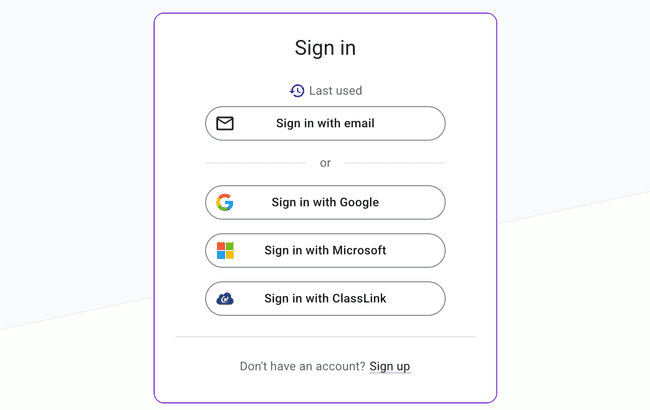
- No more guessing which button to press — If your school is set up for single sign-on, Presto spots your school email as you type it and sends you to Google or Microsoft.
- No account? No problem — Sign in with Google, Microsoft, or ClassLink without a Presto login and Presto creates one for you on the spot, instead of sending you back to sign up.
- Find your profile right away — New users create their login first, and then Presto shows any member profiles that match their email. Claim the one that’s you, or choose “None of these are me” to keep going. District admin assistants see their matching district profiles too.
- Know what to do when ClassLink says no — If ClassLink doesn’t accept a sign-in, you’ll see a friendly “sign in again” message instead of being sent to the sign-up page.
Introducing Library Checkouts 📚
You can now check sheet music in and out of your library the same way you already do with instruments and uniforms. Every title tracks who’s holding a copy, and more than one student can have the same title checked out at a time.
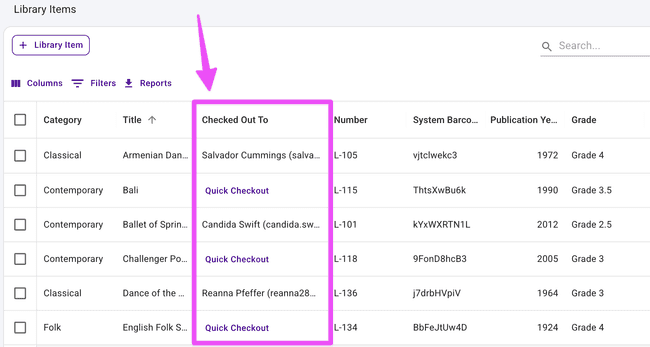
- Check out right from the table — The Library Items table has a Checked Out To column, just like Inventory and Uniforms. When nobody has an item, click Quick Checkout, choose a member, and you’re done!
- See who has what — Each library item’s page shows who has it out. Each student’s profile lists the library items they’re holding by name, and a Library Checkouts column on the Students table shows at a glance who’s still holding something.
- Check everything back in at once — When a whole section turns their music back in after a concert, check in all of a student’s library items, a selection of students, or your filtered list in one action. Because that can’t be undone, Presto asks you to type Check in all first, for library, inventory, and uniforms.
Your library data is safer and easier to export, too. Editing a library item in the table no longer erases its copyright year, and copyright years now show up in your library CSV exports.
Uniform Upgrades 👕
-
Update lots of uniforms at once — Choose the new Import Uniform Updates action on the Uniforms table and upload a CSV file. Presto matches each row by barcode or uniform number and updates the rest of the columns for you.
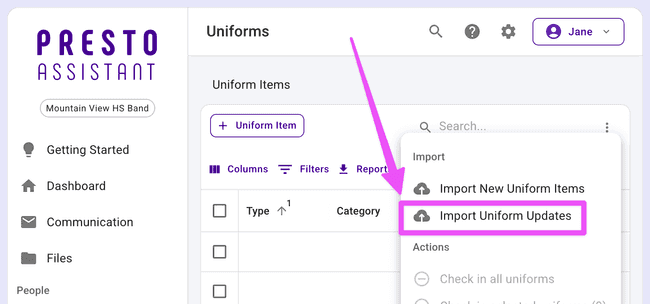
Choose Import Uniform Updates from the menu on the Uniforms table to update existing uniforms with a CSV file -
Type your own category — Uniform category is now a text field with suggestions from the categories you already use, so you can just start typing. Made a typo? It disappears from the suggestions as soon as no uniform uses it.
Add Students and Families in One Go 👨👩👧
- Connect family while you add a student — Add parents and guardians right on the New Student page with the new Family card. Presto connects them as soon as the student is created, so there’s no second trip to link families later.
- Send a welcome email as you go — Check Send a welcome email when you add a new student, parent, or helper, and they can get started right away.
- Welcome a whole group at once — Helpers with the Email Members permission can now use Send welcome emails to selected and Send welcome emails to filtered in the More Actions menu on the Students and Parents tables.
Dropdown Dynamic Fields 🔽
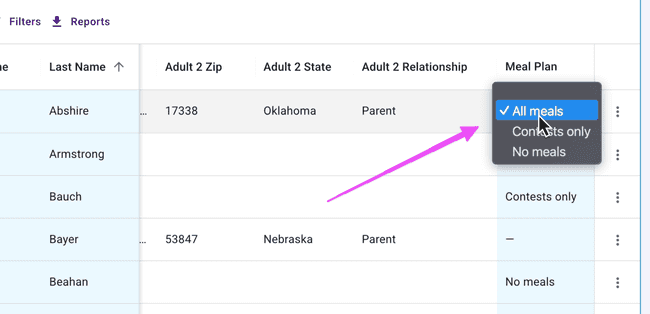
Dynamic Fields now come in a fifth type: Dropdown. When an admin creates one, they set the list of options, and from then on everyone picks from that list. That keeps your data consistent. For example, a meal plan field could offer “All meals,” “Contests only,” and “No meals.”
Forms ✍️
- Know exactly who signs — On Signature and Initials blocks, the “Only adult relatives can sign” checkbox is now a choice between Assignee and Adult Relative.
- Fewer stuck forms — Students can now finish a form after a parent signs the adult signature block, and an empty optional adult block no longer gets in the way. A block meant for the student can only be signed by the student.
Finances 💸
-
See what’s left on a credit — When you transfer a credit, a progress bar shows how much of it you’re using and how much is left, and it updates as you type. Want to move all of it? Click Use all.
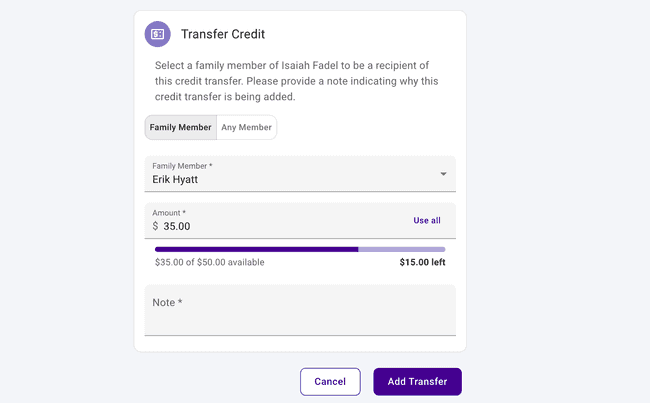
A progress bar on the Transfer Credit form shows how much of the credit you're using and how much is left -
Helper titles on financial statements — When a helper emails financial statements, families see the helper’s Title instead of their first and last name.
New Support Article 📖
The Presto Support site has a new article (with a video!): Assign Fees Based on Form Responses. Learn how to filter your form responses and assign a fee to everyone who answered a certain way.
Other Improvements
Some more updates worth knowing about:
- Find students in the command palette — Search now finds students by name, email, or student ID. Before, it always showed the same first few students.
- “Is any of” filters work again — Using the “Is any of” filter on a table no longer crashes the page.
- Dates that look right in Excel — Excel exports now use the US format (M/D/YYYY).
- Reports for admin inventory — The Admin Portal inventory table now has a Reports button. Export your current view, filters and sorting included, to CSV or Excel, just like you can at the organization level.
- Claim your district profile — When Admins and Admin Assistants sign up for Presto, they’re now matched with any existing Admin or Admin Assistant profiles and asked to claim them, the same way organization members already were.
- Transfer students out of inactive organizations — Directors in an inactive organization can now move students to another organization.
- Dashboard counts that add up — The “students with no adult relatives” card no longer counts pending or rejected students, so its number matches the Students list.
- Safari fixes — Some Safari and iPhone users no longer see an error page right after signing in, and the financial statement PDF viewer now works in older versions of Safari.
Get in Touch
That’s a wrap on October! As always, if you have questions or feedback, reach out to Presto Support at support@presto-assistant.com.
Happy teaching!